


Microsoft Dynamics 365 Business Central is a robust business management solution that’s perfect for small to medium-sized companies. Now you can improve processes, make smart decisions, and grow without limits.

Benefits
Imagine this: Your employees can securely access your business system from anywhere they are, at any time, and from any web-based device.
Is it time to transform your company into a modern, web-based system so everyone can do their job better?
-
When operating in the cloud, you can reduce your investment into infrastructure - no need for pricey servers and the high-level technical resources required to keep them running.
-
Enjoy full integration with other Microsoft products that you use every day, like Outlook. Experience a modern UX and API that will take your company into the future.
-
You are always on the latest version of Microsoft Dynamics ERP software when accessing through the cloud. Forget about remembering to back up your system – it’s all automatic.
-
You have options, on premise or subscription-based pricing to match your budget and business model.
Micro Force can help you get across the finish line and transform your on-premise ERP to cloud-based modern architecture.
The Micro Force team can work with you to improve processes and transition you to operate your business on state-of-the-art Dynamics Business Central. We’ll get you up and running rapidly, so you can start reaping the benefits of the latest Microsoft innovations.

Know your financial numbers to drive your decisions
Close the books faster than ever before, track your business performance with real-time numbers, and rely on compelling compliance and security from Microsoft.

Manage your supply chain from end-to-end
Take control of your business by gaining a complete view of sales, purchasing, manufacturing, inventory, and warehouse. Dynamics 365 Business Central unifies all your departments to streamline your supply chain and increase profits.

Close more sales and offer over-the-top service
Your sales staff can manage the entire sales process from Outlook and benefit from a connected view of customers and service operations to deliver exceptional service.

Manage projects to deliver on time and within budget
Monitor and plan your projects with real-time metrics for resources, tasks, profitability, and status.
Run your business with a business solution that doesn’t get in the way of productivity.
Get up and running quickly with a system that can grow to meet your changing needs. Use process automation to boost productivity beyond what you can imagine.

Dynamics 365 Business Central Capabilities
The Micro Force team can work with you to improve processes and transition you to operate your business on state-of-the-art Dynamics Business Central. We’ll get you up and running rapidly, so you can start reaping the benefits of the latest Microsoft innovations.
.png)
Access all the information needed to make smart decisions
Dynamics 365 Business Central connects financials, sales, purchasing, inventory, and operations for a full view of what’s happening in your business.

Proactive insight for informed decisions
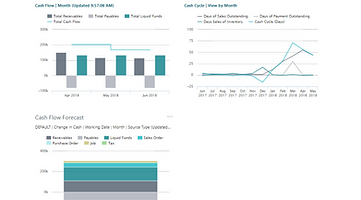
View stunning Power BI dashboards to reveal trends and allow deep insights into the next action to take.

Enjoy faster transactional processing and reporting
Business Central allows you to maintain compliance and gain quick and accurate accounts receivable and payable processes.
Powerful inventory features, so you always know what you have and what you need.
The Micro Force team can work with you to improve processes and transition you to operate your business on state-of-the-art Dynamics Business Central. We’ll get you up and running rapidly, so you can start reaping the benefits of the latest Microsoft innovations.


Replenish stock at the right time with brilliant software
Automatically create purchase orders from sales forecasts and expected stock-outs. Calculate stock levels, lead times, and reorder points automatically. Proactively suggest replacements when requested items are out of stock.

Fill orders faster with a complete view of your inventory
Create bins based on warehouse layout and storage dimensions so you can track every item transaction and movement.

Meet customer demands better
Improve production schedules by connecting manufacturing capacity and resources in a single unified view.
Boost sales and engage your customers
Create customers-for-life
Delight your customers by keeping track of all customer interactions to uncover opportunities to up-sell and cross-sell throughout your sales cycle.
Fast track the sales process
Move quickly from quote to cash. Respond rapidly to sales inquiries, stay on top of service requests, and process payments fast—without ever leaving Outlook.
Business Central allows you to manage business interactions with your customers and vendors, from within Microsoft Outlook. With the Business Central Outlook add-ins, you can see financial data related to customers and vendors, as well as create and send financial documents, such as quotes and invoices.
Dynamics 365 Business Central
Send Payments to Multiple Addresses
Dynamics 365 Business Central
Quote to Cash via Outlook
Dynamics 365 Business Central
Finance Overview
Meet Project schedules and budgets
Manage customer projects to profitability
Make use of timesheet data along with advanced job costing and reporting capabilities to evaluate and adjust the budgets on your projects.
Balance resource workloads
Plan available resource capacity to meet demand. Compare actual customer billings with planned costs on orders and quotes.
Reporting that is a dream-come-true
Gain real-time insights so you can make effective decisions. Know every project’s status, resource-usage, and profitability.

.png)
Business Central Video Library
Introducing Business Central and its seamless integration with Shopify
This video highlights the benefits that Shopify users can gain by connecting their Shopify store to Business Central to provide quality front-end shopping experiences with back-end business management capabilities.
Comparing Financial Reporting tools between Dynamics GP and Dynamics Business Central
Learn how you can use Account Schedules in Business Central to create similar financial reporting from GP.
Payables Transaction Entry - Comparing Dynamics GP to Dynamics 365 Business Central
Understand the difference of how to post payables transactions between Microsoft Dynamics GP and Microsoft Dynamics 365 Business Central.
Comparing posting accounts and posting groups between Dynamics GP and Dynamics Business Central
Learn how you can achieve similar posting account setup from GP by using posting groups in Business Central.
Comparing Trial Balance and Aging Reports between Dynamics GP and Dynamics Business Central
Learn more about printing similar GP reports such as the Trial Balance and Aging Reports in Business Central.
Comparing Segment and Dimension setup between Dynamics GP and Dynamics Business Central
Learn more about how segments from GP are migrated to dimensions in Business Central and how your chart of accounts will look once migrated.
Comparing Classes and Templates between Dynamics GP and Dynamics Business Central
Learn how templates in Business Central are similar to classes in GP and allow for streamlined data creation and improved data accuracy.
Comparing General Journal Entries between Dynamics GP and Dynamics Business Central
Learn more about the experience of entering General Journal Entries in Business Central and how it differs from GP.
Compare Correcting and Reversing Entries between Dynamics GP and Dynamics Business Central
Learn how you can correct General Journal Entries in GP and compare that to the experience of reversing those same General Journal Entries in Business Central as well as correcting dimensions on posted transactions.
Quick LM-2 for Microsoft Dynamics 365 Business Central
LM-2 solution for easy annual reports
Compare entering customer cash receipts in Dynamics GP to Dynamics Business Central
Learn how to enter in customer payments in Business Central and compare that to the experience in Dynamics GP.
Comparing Segment and Dimension transaction and reporting between Dynamics GP and Business Central
Learn how you can achieve similar posting for segmented chart of accounts from GP by using dimensions in Business Central.
Compare entering Receivables Transactions in Dynamics GP to Dynamics 365 Business Central
Learn how to enter in receivables transactions and credit memos in Business Central and compare that experience with GP.
Compare the pay vendor process in Dynamics GP with Dynamics 365 Business Central
This video demonstrates how Dynamics Business Central ensure you are paying your vendors on time while helping monitor your cash flow.
How would a Dynamics GP user process payable transactions in Dynamics 365 Business Central
How would a Dynamics GP user process payable transactions in Dynamics 365 Business Central
Processing journal entries in GP versus Business Central
Processing journal entries in GP vs. Business Central
Dynamics 365 Business Central Quote to Cash via Outlook
Dynamics 365 Business Central Quote to Cash via Outlook - manage the entire Quote to cash process in Outlook email
How to set up a customer in Dynamics 365 Business Central
In this video, learn how to register a new customer in Microsoft Dynamics 365 Business Central and get basic information to enter in Business Central when you are starting to sell to a new customer.
How to set up a bank account in Dynamics 365 Business Central
In this video, learn how to create a bank account in Microsoft Dynamics 365 Business Central in just a few simple steps.
How to create a purchase order in Dynamics 365 Business Central
In this video, you’ll learn the basic process for creating a purchase order to record the cost of purchases and to track accounts payable. Learn how to use a purchase document to buy goods with Microsoft Dynamics 365 Business Central.
How to set up an item to sell in Dynamics 365 Business Central
In this video, you'll learn what information you need to provide when you create a new item. Items along with other products, are the basis of your business and the goods or services that you trade in.
How to set up a vendor in Dynamics 365 Business Central
In this video, learn how to set up and enter basic information about a vendor in Microsoft Dynamics 365 Business Central.
Microsoft Dynamics 365 Business Central AR and Collections Management
Accounts Receivable and Collections Management for Microsoft Dynamics 365 Business Central
Finance Overview | Dynamics 365 Business Central
In this video, learn about the most popular capabilities that Business Central offers for managing business finances.
How to add and use multiple email accounts on Dynamics 365 Business Central
Learn how to add multiple email accounts to #Microsoft #Dynamics 365 Business Central, and how to specify the business scenarios in which the accounts will be used to send messages. By connecting email accounts to Business Central, administrators can enable people to send information and documents directly from the page they're using, without opening an email app. Additionally, you can define specific business scenarios for which to use an account. For example, you can specify one account for sending sales documents, and another for purchase
Introduction to Microsoft Dynamics 365 Business Central
You will see a collection of features designed for a particular role, and know how to get to other features in the application.
.png)